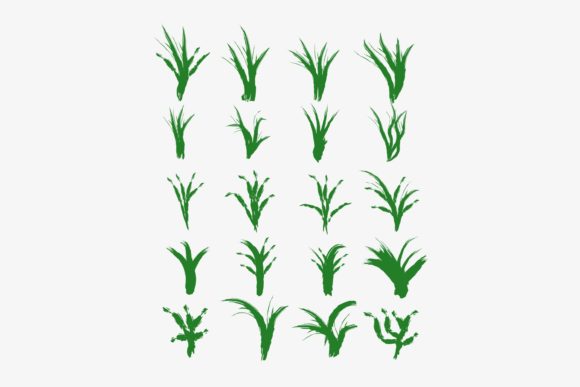
20 Set of Green Grass Patterns
Green isn’t just a color—it’s a signal: growth, calm, renewal, simplicity. These 20 Set of Green Grass Patterns translate that quiet energy into clean, versatile digital assets designed for real-world use—not just decoration. Each pattern is built from hand-drawn line art, crafted entirely on a smartphone using Infinite Design, then refined in PixelLab for precision and clarity. No vector bloat, no overcomplicated layers—just intentional, scalable shapes rooted in organic rhythm.
What You Actually Get (and Why It Matters)
When you download the zipped file, you receive three formats for every one of the 20 patterns:
- JPG — High-resolution, RGB-ready files ideal for quick mockups, social media posts, or print-ready backgrounds where transparency isn’t needed.
- PNG — Crisp 300 DPI files with transparent backgrounds—perfect for layering over photos, embedding in presentations, or adding subtle texture to web headers without clipping or white edges.
- SVG — Fully scalable vector files, optimized and lightweight. These retain sharpness at any size and integrate seamlessly into websites, Figma, Adobe XD, or even CSS background patterns.
This tri-format approach removes friction. You’re not choosing between quality and compatibility—you get both, out of the box.
Designed for Purpose, Not Just Aesthetics
The lineart style isn’t accidental. It’s functional: minimal weight, consistent stroke, open negative space. That means these patterns work as icons, symbols, or micro-illustrations—not just decorative repeats. Because they were drawn on mobile using Infinite Design, each shape prioritizes clarity over complexity. There are no gradients, shadows, or textures competing for attention. What remains is legibility, adaptability, and intention.
They’re especially effective when used as:
- Subtle website dividers or section separators (e.g., between a hero banner and features list)
- Background motifs for landing pages targeting wellness, sustainability, education, or local gardening services
- Custom bullet points or list markers in newsletters or course materials
- Branded watermark elements for digital PDFs, worksheets, or educator resources
- Sticker-style assets for Notion dashboards, Trello boards, or digital planners
Real Applications Across Real Roles
Freelancers & small business owners: Use one pattern as a consistent visual thread across your brand—repeat it as a border on invoices, embed it in email footers, or scale it large behind a “Services” headline. Consistency builds recognition faster than any slogan.
Educators & course creators: Insert grass patterns into slide decks to soften academic content—pair them with nature-themed lessons, mindfulness modules, or environmental science units. Their lineart simplicity avoids visual fatigue during long screen sessions.
Bloggers & content marketers: Swap generic stock dividers for a custom grass motif before a call-to-action or testimonial block. It adds warmth without distracting—and because it’s SVG, it loads instantly, supporting Core Web Vitals.
Hobbyists & DIY designers: Import the SVGs into Cricut Design Space or Silhouette Studio. Resize freely for vinyl decals, embroidery guides, or laser-cut wood templates—no pixelation, no re-tracing.
How to Keep Your Use Clear and Cohesive
With 20 patterns, variety is built in—but consistency still matters. Here’s how to stay focused:
- Pick one primary pattern for your core identity (e.g., the low-lying tuft for a gardening blog, the upward-sweeping blade for a yoga studio). Use it repeatedly in key touchpoints.
- Limit color variation. These are green grass patterns—but that doesn’t mean you must use green. Try monochrome versions (black on white, charcoal on cream) or duotones (forest green + sand) for contrast and accessibility.
- Respect spacing. Lineart thrives with breathing room. Avoid cramming patterns too tightly in layouts. Let them function as punctuation—not wallpaper.
- Test readability. If placing text over a pattern, use the PNG version with a light overlay (10–15% white fill) or increase text contrast. Don’t assume legibility—verify on actual devices.
Adapting Across Platforms—Without Extra Work
You don’t need separate design skills for each platform. The 20 Set of Green Grass Patterns is structured so one decision serves many contexts:
- In Figma or Adobe XD, drop the SVG directly onto your canvas—scale, recolor, or mask it without losing fidelity.
- For WordPress or Shopify, upload the SVG as a background image via CSS (
background-image: url(...);) or insert the PNG inline for guaranteed compatibility. - In Canva, upload the PNGs—they’ll retain transparency and work cleanly with Canva’s resize and filter tools.
- For print projects (brochures, flyers), use the JPGs at 300 DPI—no interpolation needed.
No conversion tools. No format anxiety. Just assets that behave predictably where you need them.
A Note on Originality and Authenticity
These aren’t AI-generated abstractions. They’re human-made, phone-drawn, thoughtfully edited. That shows up in the slight asymmetry of leaf angles, the natural variation in stroke weight, the way some blades bend left while others lift right. That authenticity resonates—especially with audiences who value craft over convenience.
That said, originality isn’t about hoarding the files. It’s about how you combine them. Try pairing a grass pattern with a hand-lettered quote in your newsletter. Layer two patterns (one scaled down, one at full size) for depth in a presentation slide. Or invert one into negative space for a logo lockup.
You’re not limited to “grass.” Think of these as modular organic shapes—adaptable to themes like resilience, balance, grounding, or slow progress. That flexibility is why educators use them for growth mindset visuals, therapists for calming worksheets, and startups for “rooted-in-values” branding.
Ready When You Are
The 20 Set of Green Grass Patterns isn’t about waiting for inspiration. It’s about lowering the barrier between idea and execution. Whether you’re launching a new service page, designing a workshop handout, or refreshing your portfolio thumbnails—these patterns offer grounded, professional-grade starting points. They save time without sacrificing voice. They support clarity without demanding attention.
And because they’re built for reuse—not one-off flair—you’ll find yourself returning to them, not as decoration, but as reliable visual language.